← notes / 2026.08.18
build log: thinkpad x220
no github repo for this one, it lives in photos and a parts list.
the project was to take my x220, flash libreboot onto it, and rebuild the hardware while i was in there. the firmware half is done as of 2026.08.18. libreboot 25.06 is on the machine, it went through on the first attempt, and the kali install that was already there booted like nothing happened. what follows starts from before i had any of the parts.
the microcenter run
went to microcenter and picked up the start of the flashing rig.
- raspberry pi zero 2 w
- microsd card
- jumper cables
i still need to order a pomona clip, a ram stick, a new display, the usb-c charging port upgrade, and a few other odds and ends before the build actually starts.
the plan
get the libreboot rom onto the raspberry pi. i opted for running the pi over ssh instead of a debian system or some other linux distro alternative, mostly because it was easier and honestly i wanted a raspberry pi anyway.
once the physical parts arrive i can disassemble it, clip onto the flash chip, and begin flashing.
the honest part
a bit worried about this one because i don’t want it to go wrong. external flashing is the kind of process where one loose jumper turns a laptop into a paperweight. going slow, reading everything twice, flashing once.
it worked (2026.08.18)
libreboot 25.06 is on the machine and it booted first try. kali came back up without me touching anything, because libreboot’s grub payload chainloaded it directly. the whole session ran about seven hours end to end, and most of that was waiting.
the machine is an x220 i bought refurbished for $160, with 8gb and a 256gb
ssd. the listing said i5-2520m. it’s actually an i5-2430m, same generation and
close in speed, it just lacks vt-d, which only matters for vm passthrough. it already had the last bios lenovo ever shipped for it on there,
8det76ww from 2018, which meant no ec update was needed first. that mattered,
because libreboot can’t update the ec after the fact. the flash chip is a
single winbond w25q64, 8mb, soic-8, sitting bottom left near the expresscard
cage under a bit of black anti-static film and silkscreened SPI1.
the pi couldn’t actually do the whole job
first real surprise. i’d assumed the pi would be the entire setup, but
preparing the rom has to happen on an x86_64 machine. libreboot’s build kit
wants x86-specific packages like libx86 and x86 cross compilers that debian
doesn’t ship for arm, so ./mk dependencies debian just fails on the pi.
so the debian box i said i was skipping in favor of the pi turned out to be mandatory anyway. the pi’s job is strictly to be the spi programmer.
vendor injection isn’t optional on sandy bridge
before flashing, intel me firmware has to get injected into the rom. libreboot
ships the release roms with DO_NOT_FLASH in the filename and a byte of
padding, and the inject step pulls down the me firmware, runs me_cleaner on it,
and strips both of those markers on success. a nice built-in way to know it
actually worked.
me_cleaner pulled KERNEL, POLICY, HOSTCOMM, RSA, CLS, TDT and FTCS out, leaving only BUP, then truncated the me region down to its 84992 byte minimum. on sandy bridge this step is mandatory rather than a nice to have. skip it and the board doesn’t boot at all.
wire length matters more than i thought
first detection attempt came back with this:
Found Generic flash chip "unknown SPI chip (RDID)" (0 kB, SPI)
my first instinct was that i’d clipped the chip on backwards. it wasn’t that.
the chip was responding, the id just wasn’t parsing, which is a signal problem
and not an orientation problem. my jumpers are 30cm, and at spispeed=128
that’s enough capacitance and crosstalk to corrupt things.
dropping to spispeed=32 fixed it completely:
Found Winbond flash chip "W25Q64BV/W25Q64CV/W25Q64FV" (8192 kB, SPI)
the lesson i’m keeping is that partial detection isn’t the same thing as wrong orientation, and that with long wires you slow the clock down instead of fighting the connection.
the backup is the entire safety net
three full reads of the stock firmware before writing anything, run inside
tmux so an ssh drop couldn’t kill one halfway through. at spispeed=32 each
read took about an hour.
all three hashed identically. i copied them over to the debian server and verified them again there, so there were two physically separate verified copies before a single byte got written. that’s the thing that turns this from “i might kill a laptop” into “worst case i re-clip and restore”.
the write
sudo flashrom -p linux_spi:dev=/dev/spidev0.0,spispeed=32 \
  -c "W25Q64BV/W25Q64CV/W25Q64FV" -w libreboot_x220.rom
about three hours in three phases, roughly an hour each to read the old
contents, erase and write, and verify. it ended on VERIFIED. which is a very
good word to see after that long.
then power down the pi before unclipping, since you never disconnect from a live rail, film back on, reassemble, battery in.
it booted. dmidecode reports smbios 3.0.0 now instead of the stock 2.6,
which is coreboot’s, so that’s independent confirmation the firmware actually
changed rather than me just hoping it did.
the ram is a different story
the plan was 16gb in dual channel, so i bought an a-tech 8gb ddr3l stick to sit alongside the samsung 8gb that came with the machine. the stick is dead on arrival.
i worked that out by elimination instead of guessing:
| test | result |
|---|---|
| a-tech and samsung together | only 8gb detected, dmidecode shows one module and no second entry at all |
| a-tech alone | doesn’t post |
| samsung alone, slot 1 | boots fine |
| samsung alone, slot 2 | boots fine |
both slots are good and the samsung is good, which isolates it to the a-tech. it’s going back under warranty and the replacement goes in when it arrives.
one thing worth remembering for the retry is that coreboot does its own sandy bridge memory init rather than using lenovo’s. 2x8gb on an x220 under coreboot is normally fine, but if a known good replacement also fails in a pair, then raminit compatibility becomes the suspect instead of the stick.
what was left after the flash
the firmware project is closed. what’s left is a short list of optional hardware.
- ram to 16gb. install the warranty replacement when it shows up, which also gets the machine into dual channel, which it isn’t running right now.
- wifi card swap. libreboot removing the whitelist is what makes this possible at all, since the stock firmware would refuse to boot with a card lenovo hadn’t blessed. the appeal is wifi 5 and bluetooth, and it’s the cheapest thing on this list by a good margin.
- fhd ips display mod, budget permitting. worth knowing that 60hz is a hard ceiling on this platform, the hd 3000 display engine can’t go past it no matter what panel goes in, so there’s no high refresh or oled version of this mod.
- usb-c charging mod, also budget permitting. a 20v pd trigger feeding the barrel jack. the x220’s ec is permissive enough that this is cleaner here than it would be on an x230.
arch is deferred. it was the original plan and i’ve pushed it back. kali is already installed, configured, and working well, and this isn’t a machine i use to a crazy degree, so tearing down a working setup i’ve put real config effort into isn’t worth the disruption right now. arch stays on the table purely as something to explore later.
once the ram is in and the wifi card, display, and usb-c are either done or passed on, this project and this machine are closed.
kali’s gone, arch is in (2026.10.14)
once the semester started i barely opened this thing. kali was doing fine, but fine on a machine i wasn’t using didn’t count for much, so last night i wiped it and put arch on. nothing got kept. about an hour from a blank drive to a working desktop.
libreboot shaped most of the install decisions:
- bios/mbr, not uefi. libreboot boots legacy, so there’s no efi partition
at all. one ext4 root across the whole disk, a 4gb swapfile, and
grub-install --target=i386-pc. seabios finds it on the mbr and boots it. - the usb has to be written in dd mode. rufus in iso mode lays it out for gpt/uefi, and libreboot won’t boot it. dd image mode does.
and a couple of things that weren’t libreboot’s fault:
- pacstrap quietly skipped packages. git, part of base-devel (
fakeroot,debugedit), and man-db just weren’t there afterward, with no error. easy to fix once noticed. the lesson is to runpacman -Qafter pacstrap instead of trusting it. - one missing
$broke the login..bash_profilelaunches x on tty1, and a single dropped$in that line made it silently do nothing.bash -x ~/.bash_profileis what found it. - dunst wouldn’t start until
.xinitrcsourced the files in/etc/X11/xinit/xinitrc.d/. that’s what handsDISPLAYto systemd user services, and without it nothing launched through dbus could find the screen.
the rice
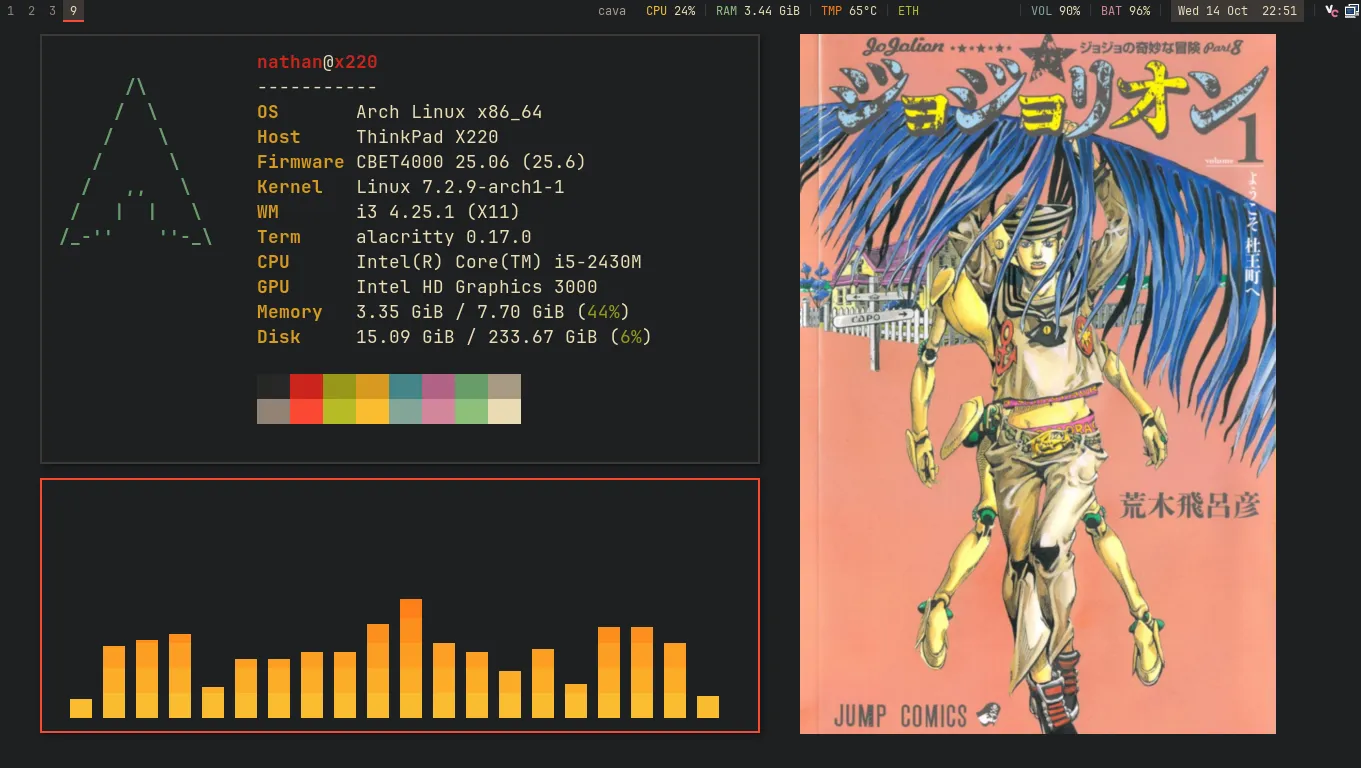 the showcase layout on workspace 9, hover for color. the local ip is blanked out of the bar on purpose.
i3 with gruvbox dark hard. nearly every choice came from the hardware.
- gruvbox over everforest or nord because the panel is a 1366x768 tn display. tn washes out low contrast palettes, and gruvbox’s warm reds, oranges, and yellows hold up on it. they also suit the black chassis and the red trackpoint.
- i3 over hyprland because the hd 3000 can’t keep up with hyprland’s effects, and i already knew i3. red focus border, square corners, 4px gaps, no title bars, jetbrains mono everywhere.
- the wallpaper is the jojolion vol. 1 cover, right aligned on the background color. i tried a duotone version first and it went muddy. duotone suits black and white ink panels, not mid-tone color art.
the rest is polybar, picom (shadows and fades, no blur, no rounding), rofi,
dunst, and cava on a yellow to orange to red gradient. the screenshot is
staged on purpose. a small showcase script switches to workspace 9 and opens
fastfetch and cava as floating windows sized so they cover the same vertical
range as the cover art, with matching margins. play music, then shift + prtsc.
what fought back:
- flameshot just didn’t work. recent versions capture through the xdg desktop portal, which i3 doesn’t have. swapped it for maim.
- i3 treats commas and semicolons as command separators, even inside quotes. any keybind that needed one turned into a small script, and the keybind runs the script.
- screenshot binds need
--release, or the tool can’t grab the keyboard. - the showcase windows kept tiling. alacritty’s
--classtakesclass,instancein that order, and my i3 rules were matching the instance, so they never fired. matching on class fixed it.
what it’s for now
it’s the build machine now. code, git, latex with a live pdf preview next to it, homelab admin over tailscale, and music at the desk. the yoga book 9i covers everything else, class notes with the pen, anything windows-only, and whatever happens away from the desk. the two complement each other instead of competing, and having one machine that’s only for focused work is the reason i wanted this one in the first place.
what’s left now
all optional, and mostly about making it portable.
- check the battery. compare
energy_fullagainstenergy_full_designand replace it if it’s under about 70%. - one disassembly for three jobs. a replacement ram stick (the dead one went back, the new one isn’t bought yet), a wifi card, and a fan clean with a repaste, since it idles at 50 to 65°c. the card that’s in there now is 2.4ghz only with no bluetooth, so an intel ac 7260 or 8260 gets it 5ghz and bluetooth as a plug and play swap.
- portability software. tlp, lock on suspend, a low battery warning in dunst, and actually testing suspend and resume under libreboot.
- display, maybe. a drop-in ips panel at stock resolution is the sensible version. the fhd mod is a bigger project than it’s worth right now.
- usb-c charging is off the list for the time being.